//First ready data from cfg file for this service. Then update according to user input and persist to file
//Use map to store key and value.
//by Feng, 10/29/2015
def serviceName = testRunner.testCase.testSuite.getPropertyValue("serviceName")
log.info(serviceName);
def serviceCfgFileName = serviceName + ".cfg.txt";
log.info(serviceCfgFileName);
def configFolder = "C://Projects//SoapUI//ESB_Services//Configuration//";
def fullFileName = configFolder + serviceCfgFileName;
FileReader rd = new FileReader(fullFileName);
BufferedReader br = new BufferedReader(rd);
def thisline = null;
def propMap = [:];
while ((thisline = br.readLine())!=null)
{
String[] propData = thisline.split("=");
propMap.put(propData[0],propData[1]);
}
log.info(propMap["sourceLocation"]);
def ui = com.eviware.soapui.support.UISupport;
//def updatedPropMap = [:];
// iterate through map and record user input while doing it.
Iterator it = propMap.entrySet().iterator();
while (it.hasNext()) {
Map.Entry pair = (Map.Entry)it.next();
log.info(pair.getKey() + "=" + pair.getValue());
def tempValue = ui.prompt("Please enter " + pair.getKey(), "text", pair.getValue());
propMap.put(pair.getKey(), tempValue);
}
// save data to cfg file.
log.info(propMap["sourceLocation"]);
2015年10月30日星期五

2015年10月28日星期三
Abstract Classes Compared to Interfaces
Abstract classes are similar to interfaces. You cannot instantiate them, and they may contain a mix of methods declared with or without an implementation. However, with abstract classes, you can declare fields that are not static and final, and define public, protected, and private concrete methods. With interfaces, all fields are automatically public, static, and final, and all methods that you declare or define (as default methods) are public. In addition, you can extend only one class, whether or not it is abstract, whereas you can implement any number of interfaces.
Which should you use, abstract classes or interfaces?
- Consider using abstract classes if any of these statements apply to your situation:
- You want to share code among several closely related classes.
- You expect that classes that extend your abstract class have many common methods or fields, or require access modifiers other than public (such as protected and private).
- You want to declare non-static or non-final fields. This enables you to define methods that can access and modify the state of the object to which they belong.
- Consider using interfaces if any of these statements apply to your situation:
- You expect that unrelated classes would implement your interface. For example, the interfaces
ComparableandCloneableare implemented by many unrelated classes. - You want to specify the behavior of a particular data type, but not concerned about who implements its behavior.
- You want to take advantage of multiple inheritance of type.
- You expect that unrelated classes would implement your interface. For example, the interfaces
An example of an abstract class in the JDK is
AbstractMap, which is part of the Collections Framework. Its subclasses (which include HashMap, TreeMap, andConcurrentHashMap) share many methods (including get, put, isEmpty, containsKey, and containsValue) that AbstractMap defines.
An example of a class in the JDK that implements several interfaces is
HashMap, which implements the interfaces Serializable, Cloneable, and Map<K, V>. By reading this list of interfaces, you can infer that an instance of HashMap (regardless of the developer or company who implemented the class) can be cloned, is serializable (which means that it can be converted into a byte stream; see the section Serializable Objects), and has the functionality of a map. In addition, the Map<K, V> interface has been enhanced with many default methods such as merge and forEach that older classes that have implemented this interface do not have to define.
Note that many software libraries use both abstract classes and interfaces; the
HashMap class implements several interfaces and also extends the abstract class AbstractMap.An Abstract Class Example
In an object-oriented drawing application, you can draw circles, rectangles, lines, Bezier curves, and many other graphic objects. These objects all have certain states (for example: position, orientation, line color, fill color) and behaviors (for example: moveTo, rotate, resize, draw) in common. Some of these states and behaviors are the same for all graphic objects (for example: position, fill color, and moveTo). Others require different implementations (for example, resize or draw). All
GraphicObjects must be able to draw or resize themselves; they just differ in how they do it. This is a perfect situation for an abstract superclass. You can take advantage of the similarities and declare all the graphic objects to inherit from the same abstract parent object (for example, GraphicObject) as shown in the following figure.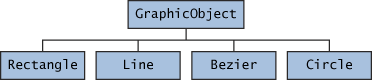
Classes Rectangle, Line, Bezier, and Circle Inherit from GraphicObject
First, you declare an abstract class,
GraphicObject, to provide member variables and methods that are wholly shared by all subclasses, such as the current position and themoveTo method. GraphicObject also declares abstract methods for methods, such as draw or resize, that need to be implemented by all subclasses but must be implemented in different ways. The GraphicObject class can look something like this:abstract class GraphicObject {
int x, y;
...
void moveTo(int newX, int newY) {
...
}
abstract void draw();
abstract void resize();
}
Each nonabstract subclass of
GraphicObject, such as Circle and Rectangle, must provide implementations for the draw and resize methods:class Circle extends GraphicObject {
void draw() {
...
}
void resize() {
...
}
}
class Rectangle extends GraphicObject {
void draw() {
...
}
void resize() {
...
}
}
When an Abstract Class Implements an Interface
In the section on
Interfaces, it was noted that a class that implements an interface must implement all of the interface's methods. It is possible, however, to define a class that does not implement all of the interface's methods, provided that the class is declared to be abstract. For example,abstract class X implements Y {
// implements all but one method of Y
}
class XX extends X {
// implements the remaining method in Y
}
In this case, class
X must be abstract because it does not fully implement Y, but class XX does, in fact, implement Y.Class Members
An abstract class may have
static fields and static methods. You can use these static members with a class reference (for example, AbstractClass.staticMethod()) as you would with any other class.Object里几种关键的methods
The
Object class, in the java.lang package, sits at the top of the class hierarchy tree. Every class is a descendant, direct or indirect, of the Object class. Every class you use or write inherits the instance methods of Object. You need not use any of these methods, but, if you choose to do so, you may need to override them with code that is specific to your class. The methods inherited from Object that are discussed in this section are:protected Object clone() throws CloneNotSupportedException
Creates and returns a copy of this object.public boolean equals(Object obj)
Indicates whether some other object is "equal to" this one.protected void finalize() throws Throwable
Called by the garbage collector on an object when garbage
collection determines that there are no more references to the objectpublic final Class getClass()
Returns the runtime class of an object.public int hashCode()
Returns a hash code value for the object.public String toString()
Returns a string representation of the object.
The
notify, notifyAll, and wait methods of Object all play a part in synchronizing the activities of independently running threads in a program, which is discussed in a later lesson and won't be covered here. There are five of these methods:public final void notify()public final void notifyAll()public final void wait()public final void wait(long timeout)public final void wait(long timeout, int nanos)
Note: There are some subtle aspects to a number of these methods, especially the
clone method.The clone() Method
If a class, or one of its superclasses, implements the
Cloneable interface, you can use the clone() method to create a copy from an existing object. To create a clone, you write:aCloneableObject.clone();
Object's implementation of this method checks to see whether the object on which clone() was invoked implements the Cloneable interface. If the object does not, the method throws a CloneNotSupportedException exception. Exception handling will be covered in a later lesson. For the moment, you need to know that clone() must be declared asprotected Object clone() throws CloneNotSupportedException
or:
public Object clone() throws CloneNotSupportedException
if you are going to write a
clone() method to override the one in Object.
If the object on which
clone() was invoked does implement the Cloneable interface, Object's implementation of the clone() method creates an object of the same class as the original object and initializes the new object's member variables to have the same values as the original object's corresponding member variables.
The simplest way to make your class cloneable is to add
implements Cloneable to your class's declaration. then your objects can invoke the clone() method.
For some classes, the default behavior of
Object's clone() method works just fine. If, however, an object contains a reference to an external object, say ObjExternal, you may need to override clone() to get correct behavior. Otherwise, a change in ObjExternal made by one object will be visible in its clone also. This means that the original object and its clone are not independent—to decouple them, you must override clone() so that it clones the object and ObjExternal. Then the original object referencesObjExternal and the clone references a clone of ObjExternal, so that the object and its clone are truly independent.The equals() Method
The
equals() method compares two objects for equality and returns true if they are equal. The equals() method provided in the Object class uses the identity operator (==) to determine whether two objects are equal. For primitive data types, this gives the correct result. For objects, however, it does not. The equals() method provided by Objecttests whether the object references are equal—that is, if the objects compared are the exact same object.
To test whether two objects are equal in the sense of equivalency (containing the same information), you must override the
equals() method. Here is an example of a Book class that overrides equals():public class Book {
...
public boolean equals(Object obj) {
if (obj instanceof Book)
return ISBN.equals((Book)obj.getISBN());
else
return false;
}
}
Consider this code that tests two instances of the
Book class for equality:// Swing Tutorial, 2nd edition
Book firstBook = new Book("0201914670");
Book secondBook = new Book("0201914670");
if (firstBook.equals(secondBook)) {
System.out.println("objects are equal");
} else {
System.out.println("objects are not equal");
}
This program displays
objects are equal even though firstBook and secondBook reference two distinct objects. They are considered equal because the objects compared contain the same ISBN number.
You should always override the
equals() method if the identity operator is not appropriate for your class.Note: If you override
equals(), you must override hashCode() as well.The finalize() Method
The
Object class provides a callback method, finalize(), that may be invoked on an object when it becomes garbage. Object's implementation of finalize() does nothing—you can override finalize() to do cleanup, such as freeing resources.
The
finalize() method may be called automatically by the system, but when it is called, or even if it is called, is uncertain. Therefore, you should not rely on this method to do your cleanup for you. For example, if you don't close file descriptors in your code after performing I/O and you expect finalize() to close them for you, you may run out of file descriptors.The getClass() Method
You cannot override
getClass.
The
getClass() method returns a Class object, which has methods you can use to get information about the class, such as its name (getSimpleName()), its superclass (getSuperclass()), and the interfaces it implements (getInterfaces()). For example, the following method gets and displays the class name of an object:void printClassName(Object obj) {
System.out.println("The object's" + " class is " +
obj.getClass().getSimpleName());
}
The
Class class, in the java.lang package, has a large number of methods (more than 50). For example, you can test to see if the class is an annotation (isAnnotation()), an interface (isInterface()), or an enumeration (isEnum()). You can see what the object's fields are (getFields()) or what its methods are (getMethods()), and so on.The hashCode() Method
The value returned by
hashCode() is the object's hash code, which is the object's memory address in hexadecimal.
By definition, if two objects are equal, their hash code must also be equal. If you override the
equals() method, you change the way two objects are equated and Object's implementation of hashCode() is no longer valid. Therefore, if you override the equals() method, you must also override the hashCode() method as well.The toString() Method
You should always consider overriding the
toString() method in your classes.
The
Object's toString() method returns a String representation of the object, which is very useful for debugging. The String representation for an object depends entirely on the object, which is why you need to override toString() in your classes.
You can use
toString() along with System.out.println() to display a text representation of an object, such as an instance of Book:System.out.println(firstBook.toString());
which would, for a properly overridden
toString() method, print something useful, like this:ISBN: 0201914670; The Swing Tutorial; A Guide to Constructing GUIs, 2nd Edition
ZZ from https://docs.oracle.com/javase/tutorial/java/IandI/objectclass.html
2015年10月19日星期一
鏖战Maven
项目需要用maven实现soapui自动测试。
开始单个测试很简单,之后的多个测试自动化颇花费我几天研究。以下两个链接有一定帮助。
http://appletest.lofter.com/post/1d595918_7f8880b
http://forum.loadui.org/viewtopic.php?f=14&t=5381&sid=287d90541a28f9243a7010fb683173f5
最终是用一个parent pom 以及多个child pom解决。(maven 的 profile)
Parent pom.xml :
<?xml version="1.0" encoding="UTF-8"?>
<project xmlns="http://maven.apache.org/POM/4.0.0"
xmlns:xsi="http://www.w3.org/2001/XMLSchema-instance"
xsi:schemaLocation="http://maven.apache.org/POM/4.0.0
http://maven.apache.org/maven-v4_0_0.xsd">
<modelVersion>4.0.0</modelVersion>
<groupId>org.pbs.tno.ci.test</groupId>
<artifactId>master</artifactId>
<version>1.0</version>
<packaging>pom</packaging>
<name>Automated Testing Master</name>
<pluginRepositories>
<pluginRepository>
<id>SmartBearPluginRepository</id>
<url>http://www.soapui.org/repository/maven2/</url>
</pluginRepository>
</pluginRepositories>
<properties>
<soapui.rootdir>/../SOAPUI</soapui.rootdir>
</properties>
<profiles>
<profile>
<id>test</id>
<properties>
</properties>
<modules>
<module>Tests/SimpleTest/TestCase1</module>
</modules>
</profile>
<profile>
<id>notification_agent</id>
<modules>
<module>Tests/NotificationAgent/TestCase1</module>
</modules>
</profile>
<profile>
<id>qc_service</id>
<modules>
<module>Tests/QCService/TestCase1</module>
</modules>
</profile>
<profile>
<id>transfer_service</id>
<modules>
<module>Tests/TransferService/TestCase1</module>
</modules>
</profile>
</profiles>
</project>
Child pom:
<project xmlns="http://maven.apache.org/POM/4.0.0" xmlns:xsi="http://www.w3.org/2001/XMLSchema-instance"
xsi:schemaLocation="http://maven.apache.org/POM/4.0.0 http://maven.apache.org/xsd/maven-4.0.0.xsd">
<modelVersion>4.0.0</modelVersion>
<parent>
<groupId>org.pbs.tno.ci.test</groupId>
<artifactId>master</artifactId>
<version>1.0</version>
<relativePath>../../../pom.xml</relativePath>
</parent>
<artifactId>TransferService</artifactId>
<packaging>jar</packaging>
<version>1.0-SNAPSHOT</version>
<name>testmaven2</name>
<pluginRepositories>
<pluginRepository>
<id>SmartBearPluginRepository</id>
<url>http://www.soapui.org/repository/maven2/</url>
</pluginRepository>
</pluginRepositories>
<build>
<plugins>
<plugin>
<groupId>com.smartbear.soapui</groupId>
<artifactId>soapui-pro-maven-plugin</artifactId>
<version>5.1.2</version>
<dependencies>
<dependency>
<groupId>org.reflections</groupId>
<artifactId>reflections</artifactId>
<version>0.9.9-RC1</version>
</dependency>
<dependency>
<groupId>org.apache.poi</groupId>
<artifactId>poi-ooxml</artifactId>
<version>3.10-FINAL</version>
</dependency>
<dependency>
<groupId>com.microsoft.sqlserver</groupId>
<artifactId>sqljdbc4</artifactId>
<version>4.0</version>
<scope>runtime</scope>
</dependency>
</dependencies>
<executions>
<execution>
<id>soapUI1</id>
<phase>test</phase>
<goals>
<goal>test</goal>
</goals>
<configuration>
<projectFile>/Feng/Maven SoapUI test projects/Build/Tests/TransferService/TestCase1/TransferService-soapui-project.xml</projectFile>
</configuration>
</execution>
</executions>
</plugin>
</plugins>
</build>
</project>
如果想同时run 这两个test,输入:
mvn test -Ptransfer_service -Ptest
如果用的是Ready API,千万要注意也得用Ready API Maven Plugin, 而不是SoapUI pro maven plugin! 血泪教训,花了整整两天才发现错误出自这!。
如果想同时run 这两个test,输入:
mvn test -Ptransfer_service -Ptest
如果用的是Ready API,千万要注意也得用Ready API Maven Plugin, 而不是SoapUI pro maven plugin! 血泪教训,花了整整两天才发现错误出自这!。
2015年10月1日星期四
Soapui Maven插件使用指南:soapui-pro-maven-plugin (转载)
- 安装 maven
- 下载soapui-pro-maven-plugin-5.1.2.jar 这是目前最新版本:
- 用命令安装插件包:mvn org.apache.maven.plugins:maven-install-plugin:2.5.2:install-file -Dfile=/Users/applewu/Downloads/soapui-pro-maven-plugin-5.1.2.jar -DgroupId=com.smartbear.soapui-DartifactId=soapui-pro-maven-plugin-5.1.2.jar -Dpackaging=jar;
- 为你的 soapui 项目准备相应的 pom.xml,保证 pom.xml 与 soapui 项目文件在同一目录下。pom.xml 格式参考官网:http://www.soapui.org/test-automation/maven/maven-2-x.html
- 命令运行 soapui 项目: mvn com.smartbear.soapui:soapui-pro-maven-plugin:5.1.2:test
# 踩过的坑
过程看起来很简单,如果你有了基础的maven知识,在前三步根本就没有问题,你会如愿地看到本地的maven库中已经下载了相关的jar包 (我的mac默认路径是:/Users/applewu/.m2/repository/)。咱们主要谈谈第4,5步。
## pom.xml 造成的坑
官网上有一个所谓的 full example,但你需要透彻地理解pom.xml与soapui项目之间的对应关系。你需要更新的字段有:
- project/groupId:取一个你认为有意义的命名-组织名
- project/artifactId:这个必须是你要执行的soapui项目的名称,比如文件名是Demo4SoapuiMaven-soapui-project.xml,那么artifactId就是Demo4SoapuiMaven
- project/name:取一个你认为有意义的命名-测试名
- project/url: 可以删掉
- plugin/version:你想用哪个插件版本就写哪个,最新是5.1.2
- plugin/executions/execution/configuration/projectFile: 待运行的soapui文件全名,如Demo4SoapuiMaven-soapui-project.xml
pom.xml如果有误,会直接影响 maven 的运行结果。如果你用的是ReadyAPI,还可能会遇到 NoClassDefFoundError: org/reflections/Configuration;那么你需要在plugin节点中加入:
```xml
<dependencies>
<dependency>
<groupId>org.reflections</groupId>
<artifactId>reflections</artifactId>
<version>0.9.9-RC1</version>
</dependency>
<dependency>
<groupId>org.apache.poi</groupId>
<artifactId>poi-ooxml</artifactId>
<version>3.10-FINAL</version>
</dependency>
</dependencies>
```
官网说明 http://readyapi.smartbear.com/readyapi/integration/maven/maven2
## 一行命令挖下的坑
第5步就是一个命令,哪来什么坑呢?而这才是最让我恶心的。大家都知道soapui有免费版和pro收费版,然而在readyapi 和 soapui的官网,full example 是以 pro 版本为例的,而 running tests 这一节中,又是以 免费版为例,做出的说明。即:mvn com.smartbear.soapui:soapui-maven-plugin:4.6.1:test
即便你在pom.xml 中定义的插件是soapui-pro-maven-plugin,但由于你在执行命令的时候,是照着官网文档,用soapui-maven-plugin,所以maven还是以免费版的soapui去执行你的脚本。这很容易让人困惑,因为你本地根本没有免费版的soapui,免费版和收费版的soapui从外观上就明显不一样,安装文件都是两套,不仅仅是active licenese的问题。
当然,如果你的soapui脚本中并没有用到pro版本的特性,比如json path assertion什么的,那么你体会不到有什么不同。否则,你照着官网文档的命令运行之后,soapui脚本会出现大面积 Errors,新手就难以理解了,因为抛出脚本的异常,而不是maven的异常,但其实脚本在你本地的soapui pro,用test runner运行一点儿问题也没有...
原帖: http://appletest.lofter.com/post/1d595918_7f8880b#
原帖: http://appletest.lofter.com/post/1d595918_7f8880b#
2015年3月24日星期二
Performance tuning of throughput-based SOA solutions for WebSphere Process Server
http://www.ibm.com/developerworks/websphere/library/techarticles/1009_faulhaber/1009_faulhaber.html
Introduction
During the past years, many companies incorporated IBM® service-oriented architecture (SOA) technology to make their business more responsive, to gain more flexibility, and of course, to save money from streamlined business processes. Some of these companies started with rather small, more or less problem-focused solutions. Others found that a more holistic approach, including transformation of whole lines of business, was the best way to deploy service-oriented infrastructure and applications. However, when talking about IBM’s SOA stack, what all of these companies have in common is IBM WebSphere® Process Server (hereafter called Process Server) as a core component to build their infrastructure.
Figure 1. Operational reference architecture of WebSphere Process Server

Since many successful projects have proven that the service-oriented approach gives companies a key business advantage, the number of newly built applications is still increasing dramatically. Additionally, the focus is more on high volume applications and highly business critical solutions. This leads to new challenges for the companies’ SOA infrastructure. In this respect, especially the performance aspect, it is the deciding factor for a long-term success of any Process Server installation.
When talking about performance, consider that service-oriented applications typically have different requirements. However, from a technical perspective, all solutions (or at least major parts of a solution) may be put in one of the following categories:
- Response time focused (for example, a Portal-based BPEL workflow)
- High throughput focused (for example, straight through processing workflow)
Since both categories have their own performance goals, you need to apply a custom performance tuning approach. However, this article will mainly deal with the optimization of high throughput-focused applications.
Response time vs. high throughput
For the performance aspect of solutions that are developed with a service-oriented approach, there are two main types: response time focused applications and high throughput-oriented applications.
The typical scenario for response time based applications is where users wait for the response of a GUI interaction (consider a Process Portal application, for example). Moreover, the response’s time to arrival is usually tied to a certain Service Level Agreement that has to be met. The response time based applications typically involve numerous synchronous requests. Since most of the system interaction is short, these requests tend to be stateless.
Some other characteristics of response time based applications are:
- Concurrency relates to the number of expected clients
- Performance tuned to handle peaks
- Errors are often ignored because of client handle retries (if something goes wrong)
To meet these performance characteristics, the solution is tuned to minimize delays between requests and to deliver fast response times for all user interactions.
For throughput based applications, there is typically no user waiting for a response from the system. Instead, most customers have defined a Service Level Agreement that sets a specific goal on events per time period (for example, the system needs to handle a throughput of 10,000 workflows per hour). Besides, there are many characteristics for this type of SOA solution:
- Concurrency relates to performance tuning
- Performance tuned for high CPU utilization
- Errors must be handled or resolved because of the server handle retries
Throughput-based applications are typically designed with a high number of asynchronous communications. These solutions tend to use messaging (such as JMS or WebSphere MQ) functions heavily. Moreover, an important aspect is the stateful nature of throughput-based applications, since their goal is to process as many requests (in a given period of time) as possible. This has to be done with as few human interactions as possible. Therefore, there is a need for persisting state and to apply smart error handling strategy.
As you may imagine, the tuning methodologies for these two types of SOA solutions are different from each other. This article only focuses on one of them, throughput-based solutions. The following sections will introduce an approach to tune these solutions and will highlight key aspects.
Methodology for tuning high throughput applications
In a service-oriented world, solutions tend to consist of many heterogeneous parts that are loosely coupled to each other. When thinking about performance tuning, all of these parts need to be taken into account: hardware, other software components, third party systems, and of course, the application itself. In most cases, this is a complex and time consuming task.
This article introduces a simple approach that takes care of the special requirements of SOA solutions, while focusing on the key pain points that are relevant for WebSphere Process Server applications (Figure 2).
Figure 2. Tuning process for high throughput applications

Application architecture and design
The application’s architecture and the concrete design of each contained component will have a high impact on the performance of the overall solution. You need to take into account many aspects while implementing a solution. Some of them cannot be easily changed after deployment, and others are simply too expensive to fix in a productive application.
Many of these key performance aspects are configured in IBM’s development environment called WebSphere Integration Developer (hereafter called Integration Developer). Some of them are:
- Transactional boundaries
- Invocation styles
- Module granularity
- Implementation types of components
The earlier you think about modelling for performance during the design phase of your solution, the better it will perform in the end.
Infrastructure optimization
One key aspect to discuss during the planning phase of your solution is the operational model. When talking about Process Server, there are three proven reference architectures that you can use (see WebSphere Business Process Management V6.2 Production Topologies). Each of them fulfills different requirements in terms of high availability and scalability.
Another aspect is the correct sizing of the chosen infrastructure. Ensure that you have enough hardware resources that may be plugged in shortly. Pay special attention to the database server’s resources, since it will be a focal point for a high throughput solution.
Finally, think of how to enable the hardware to be utilized as efficiently as possible. You need to tune the solution for parallelism to a healthy extent. In terms of Process Server, the concurrency of requests may be influenced by a couple of resources within the server:
- Thread pools
- Activation specifications
- Queue connection factories
- Listener ports
- Data sources
In summary, the key to a high performance infrastructure is a mixture of the right application design, enough resources, and a well-tuned Process Server system.
Database optimization
The application architecture of most high throughput applications tends to use Process Server features (such as long-running BPEL processes) that need to persist in a certain state. As a result, Process Server uses its databases. See WebSphere Process Server operational architecture: Part 1: Base architecture and infrastructure components for an introduction to Process Server data stores. Therefore, it is crucial that the databases are properly tuned. This actually means that all relevant parameters (such as buffer pools, maximum connections, and so on) are sufficient to handle the expected load. Moreover, you need to establish a regular maintenance process. The process needs to cover at least an update of the database statistics (also known as RUNSTATS in terms of DB2®) and a reorganization of Process Server database tables. You can find a good starting point for setting up such a process in the article Operating a WebSphere Process Server environment, Part 3: Setup, configuration, and maintenance of the WebSphere Process Server Business Process Choreographer database.
Therefore, the focal points for a well performing Process Server database are a mixture of hardware resources, proper tuning, and regular maintenance activities.
Application architecture and design
The application is the first part to tune in the above described methodology. The architecture and the design of an application have a significant impact on the overall performance.
SCA modules vs. mediation modules
Throughput-based applications usually include no or little human interaction. You will likely have the opportunity to add integration logic into the mediation modules. These modules have the great advantage in that they may easily be exchanged if the interface stays the same. Moreover, the mediation modules are far more lightweight than SCA modules (containing BPEL processes) and tend to perform well when integrating other systems. For example, consider the integration of a WebSphere MQ system where native data has to be converted to another format. Try to separate your business logic from supporting code into different modules and keep in mind to minimize the number of SCA modules for your application.
Module granularity
The next point to think about is granularity. However, it is not always easy to find the right dimension of granularity. Adaptability plays an important role when making the decision on how granular your modules should be. However, in the end it depends on how much flexibility you need to sacrifice to meet your performance targets. Keep in mind that more modules need more resources (for example, queues on the Service Integration Buses) and generate a higher footprint on your system. Additionally, inter-module requests are slower than intra-module requests. That is why you need to place components together that communicate with each other often. Figure 3 shows the dependency between performance and granularity or flexibility. For a high throughput application, you need to aim to for the “green zone”.
Figure 3. Granularity vs. performance

Interaction style: synchronous vs. asynchronous
Another important point is the interaction style that is used for communication by your SCA components. Try to use synchronous calls whenever possible. Make sure that the interaction style is set to synchronous where possible:
- Open the Business Integration perspective in Integration Developer.
- Open the Assembly Diagram of a specific module.
- Click on one of the available interfaces.
- Click Properties > Details > Preferred interaction style as shown in Figure 4.
Figure 4. Preferred interaction style setting

Asynchronous calls make sense for throughput-based applications under certain circumstances. For instance, asynchronous calls to backend services might be feasible to free up the resources on the server. This is especially useful in scenarios where synchronous calls just queue up in the system, while blocking threads and keeping transactions open.
If you are using WebSphere Business Integration Adapters within your modules, you can set them to synchronous event delivery as well.
- Open the Business Integration perspective in Integration Developer.
- Open the Assembly Diagram of a specific module.
- Right-click on the adapter export box.
- Select Show in Properties > Binding tab > Performance attributes.
Transaction handling
In addition to communication style, the underlying handling of transactions is an important point as well. Since each creation of a transaction context consumes resource on your infrastructure, it is a good practice to keep the amount of transactions as little as feasible. The transaction boundaries are influenced by some Quality of Service parameters that are available for mediation and SCA modules. Wherever possible try to accomplish the following:
- Set “Join transaction” to “true” on all interfaces.
- Set “Suspend transaction” to “false” on all reference partners.
- Set “Transaction” to “global” on the implementation.
You can configure these parameters as follows:
- Open the Business Integration perspective in Integration Developer.
- Open the Assembly Diagram of a specific module.
- Right-click on the Assembly Diagram and choose Show in Properties.
- Click on Qualifiers and set the parameters (see Figure 5).
Figure 5. Transaction setting optimized for performance

Short-running vs. long-running processes
BPEL processes have multiple properties that have a high impact on how the processes are handled in the Business Flow Manager (BFM). One of the most important parameters is the execution type of a workflow: you may choose between long-running and short-running processes. This choice has an impact on the performance of your overall solution: a short-running process runs in a single transaction while keeping all information on the state in memory. This is extremely fast, since the BFM does not need to save the workflow’s activities to its data store. On the other hand, long-running processes are executed in several transactions. The workflow state is persisted in the Process Server databases, which can make a solution more resilient in terms of error handling. Overall, long-running BPEL processes perform a lot slower than short-running ones.
As short running process need fewer resources and are easier to maintain during versioning cycles, try to use short-running processes whenever possible. For example, you can spread your business logic in a way that the main path uses short-running process and only the exceptional case starts a long-running process.
You can configure the process type as follows:
- Open the Business Integration perspective in Integration Developer.
- Open the Assembly Diagram of a specific module.
- Double-click on a specific BPEL process.
- Click the process settings icon on the right pane, as shown in Figure 6.
Figure 6. Process settings for a specific workflow
- Choose Details > Process is long-running as shown in Figure 7.
Figure 7. Setting the execution type for a workflow


Transaction count
As already mentioned in the previous sections, you may want to minimize the number of transactions in order to gain the best possible performance for your high throughput application. In the case of long-running processes (that usually consist of a couple of transactions), the amount of transactions are influenced by a parameter called “Transactional behavior”. It allows you to control where the transaction boundaries in a workflow are set. It is a good idea to set the “Transactional behavior” to “Participates”, since this minimizes the creation of new transactions. The default is “commit after” so a new transaction is started when the activity has finished. Keep in mind that this leads to longer transaction execution times, which may have a negative effect on response time. Moreover, the chance of running into deadlocks is increased. That is why you need to test this optimization well.
You can configure the process type as follows:
- Open the Business Integration perspective in Integration Developer.
- Open the Assembly Diagram of a specific module.
- Double-click on a specific BPEL process.
- Right-click on an activity of the type Receive, Human Task, Invoke, Snippet and choose Show in Properties.
- Click Server (Figure 8).
Figure 8. Transactional behavior of long-running BPEL processes

Persistence of business-relevant data
When navigating through a long-running process, the activity instance data is usually persisted to the BFM’s data store. The configuration option “persistence of business-relevant data” reduces the amount of data persisted, and therefore, optimizes your database I/O. This can make a difference when your scenario includes many BPEL processes, including many activities. In such a scenario, try to disable the persistence of business-relevant data wherever possible.
You can configure the process type as follows:
- Open the Business Integration perspective in Integration Developer.
- Open the Assembly Diagram of a specific module.
- Double-click on a specific BPEL process.
- Right-click on an activity of the type Receive, Human Task, Invoke, Snippet and choose Show in Properties.
- Click Server (Figure 9).
Figure 9. Persistence of business-relevant data

Using custom and query properties
In many situations, you need to attach information to an instance of a long-running process that you can query later on. Consider that you may want to enrich your high-throughput workflows with a certain type of ID, such as “customer ID”. Fortunately, Integration Developer provides you two kinds of concepts to accomplish this task: custom properties and query properties. On the one hand, each of these properties enriches your processes with certain information and allows you to fulfill your solution’s requirements, such as “generate a report that contains all processed customer IDs”. On the other hand, keep in mind that each of these properties leads to additional rows in the BFM’s datastore. Try to use as few as possible custom and query properties for your high-throughput solution.
You can check the configured custom properties as follows:
- Open the Business Integration perspective in Integration Developer.
- Open the Assembly Diagram of a specific module.
- Double-click on a specific BPEL process.
- Click on the process settings icon in the right pane (Figure 10).
Figure 10. Process settings for a specific workflow
- Choose Environment to see the configured custom properties as shown in Figure 11.
Figure 11. Custom properties for a BPEL workflow


The query properties are defined by a process variable. You can check them as follows:
- Open the Business Integration perspective in Integration Developer.
- Open the Assembly Diagram of a specific module.
- Double-click on a specific BPEL process.
- Right-click on a variable in the right pane and select Show in properties.
- Select Query Properties (Figure 12).
Figure 12. Configure query properties for a process variable

Using query tables
In some high throughput scenarios, you may need to query business data contained in the BFM’s datastore on a recurring basis (for example, select all process instances with customer ID “XY”). According to the complexity of the queries (especially when custom properties or query properties are included), this may affect the runtime performance of the overall high throughput solution. The query tables concept offers a smart approach to query the business data in a highly optimized way.
If there is a need for querying business data from Process Server databases in your high throughput scenario, then use query tables.Business Process Choreographer: Query Tables features a detailed description on how to use and configure them.
Infrastructure optimization
After applying the application architecture and design guidelines, you are ready to deploy your application to your infrastructure. The following sections mainly deal with the infrastructure aspects for a well performing high-throughput solution. We recommend that you work through all of the following sections before starting any performance tests.
Choosing the right topology
An important aspect is the WebSphere Process Server topology that is used to run a high-throughput solution. Currently, there are three different topologies available. The following section gives you a brief overview of advantages and disadvantages. A more detailed description of the available topologies is found at WebSphere Business Process Management V6.2 Production Topologies, “Part 2. Building topologies for WebSphere Process Server”:
- Single cluster: This is also known as the "Bronze" topology. In this topology, all the functional pieces (user applications, messaging infrastructure, CEI, support applications) run in one cluster. This actually means that you need less hardware resources than with the other topologies. However, the caveat is a sub-optimal separation of concerns. Consider the following example: the CEI infrastructure runs in the same JVM as your application. Since you can run the CEI workload completely as asynchronous, it does not interfere with your application workload.
- Remote messaging: This is also known as the "Silver" topology. This approach features a basic separation of concerns: all messaging functions run in their own cluster, and therefore, scale independently from other components. Process Server system applications, user applications, and so on coexist in a separate same cluster. In total, there are two clusters created. This topology features a good balance between resource consumption and the ability to scale well.
- Remote messaging and remote support: This is also known as the "Golden" topology. In this topology, there are three clusters:
- Application: Cluster where all user applications are run.
- Messaging: Cluster where the messaging infrastructure is configured.
- Support: Cluster primarily runs the Common Event Infrastructure (CEI), and also other support applications, such as the Business Rule Manager.
Figure 13. Overview of WebSphere Process Server Golden topology

The third option, the “Golden topology”, is the most scalable and flexible one. It provides the best separation of concerns since the business applications run (almost) independently from the supporting Process Server applications. This enables you to tune the Process Server infrastructure, especially for the requirements of high-throughput applications. We highly recommend choosing the “Golden topology” when dealing with these types of applications.
Java Virtual Machine settings
The proper tuning of your Java Virtual Machines (JVM) plays an important role for a well performing system. The optimization of your JVMs covers the following topics:
Garbage collection policy
This policy determines how the JVM handles garbage collection (GC) for its heap memory. It has shown that throughput-based applications perform best with the “Generational concurrent” policy.
You can configure the policy as follows:
- Open the WebSphere Administrative Console.
- Select Servers > Application Servers > <SERVER_NAME> > Java and Process Management > Process definition > Java Virtual Machine.
- Add
-Xgcpolicy:genconto the “Generic JVM arguments”. - Save the changes to your Process Server configuration.
Enable verbose garbage collection
This option allows you to switch on logging for all actions that are performed by the JVM concerning GC. These logs are essential for performance analysis of an application. Therefore, always enable verbose GC, even in a production system.
You can configure this setting as follows:
- Open the WebSphere Administrative Console.
- Select Servers > Application Servers > <SERVER_NAME> > Java and Process Management > Process definition > Java Virtual Machine.
- Enable the checkbox Verbose garbage collection.
- Save the changes to your Process Server configuration and restart your environment.
Heap settings
For a set of successfully tested configuration parameters, see the Example configuration set section.
You can configure the settings as follows:
- Open the WebSphere Administrative Console.
- Select Servers > Application Servers > <SERVER_NAME> > Java and Process Management > Process definition > Java Virtual Machine.
- Add
-Xmn<NURSERY_SIZE>mto the Generic JVM arguments”. For example,-Xmn704m. - Enter the minimum heap in the field “Initial Heap Size”.
- Enter the maximum heap in the field “Maximum Heap Size”.
- Add
- Save the changes to your Process Server configuration and restart your environment.
Note: These steps need to be done for each application server in your Process Server environment.
Thread pools
WebSphere uses thread pools to control and manage the concurrency of activities. Each JVM of your Process Server topology has its own set of thread pools. Each of the pools determines how many workers you have for certain tasks. There is an implicit relationship between the number of threads and the consumption of CPU resources: the more the threads work, the more your CPU gets utilized. However, keep in mind that too many threads may have a negative effect on the overall performance. In terms of the high-throughput scenario described in this article, we plan to have a high CPU usage. You need to tune the thread pools to a value where the provided resources are used to a reasonable extent, while having enough CPU time left for peak situations.
From a Process Server point of view, you need to concentrate on three specific thread pools:
- Default: This pool is used by various components that run in a JVM. You must highlight Message Driven Beans (MDB) because Process Server uses them heavily.
- ORB.thread.pool: The Object Request Broker pool is leveraged for remote EJB calls, for example, when the Business Flow Manager API or Human Task Manager API is called. Since this pool is only leveraged for remote EJB calls, the default value is acceptable for many scenarios. However, keep this parameter in mind when your scenario includes a high number of connects from external application clients.
- WebContainer: This pool handles all HTTP and web services requests that are fulfilled by the JVM.
See the Example configuration set section for a set of successfully tested configuration parameters. You can configure the settings as follows:
- Open the WebSphere Administrative Console.
- Select Servers > Application Servers > <SERVER_NAME> > Thread Pools.
- Change the “Maximum Size” for a specific thread pool.
- Save the changes to your Process Server configuration and restart your environment.
Note: You need to do these steps for each application server in your Process Server environment.
J2C activation specs
eis/BPEInternalActivationSpec
As described in the previous sections, try to minimize the use of long-running BPEL processes when designing a high-throughput application. However, in most cases it is not possible only to use short runners. When dealing with long-running processes, it is important to ensure that the Process Server’s workflow engine uses JMS messages to navigate through the process instances (these messages are also known as navigational messages). A certain amount of messages (the amount actually depends on the transaction boundaries set in the BPEL workflow, see the Transaction count section) need to be consumed to complete a specific process instance. That is why the processing needs to scale well in order to guarantee a high throughput. This may be achieved by tuning the “eis/BPEInternalActivationSpec” J2C activation specs. Keep in mind that this setting may not be relevant when using the work manager-based navigation (see the Work Manager based navigation section).
SCA module specific activation specs
Additionally, there are a number of activation specs that are application specific. At a minimum, there is one activation spec per SCA or mediation module that handles asynchronous invocations of that module. This is important when dealing with high throughput applications since all modules need a high level of concurrency.
See the Example configuration set section for a set of successfully tested configuration parameters. You can configure the settings as follows:
- Open the WebSphere Administrative Console.
- Select Resources > Resource Adapters > J2C Activation Specifications > <NAME> > J2C activation specification custom properties.
- Change the according property.
- Save the changes to your Process Sever configuration and restart your environment.
J2C connection factories
In addition to activation specs, you also need to consider tuning the J2C connection factories to achieve good performance in a high throughput scenario. Besides the custom connection factories that you may have defined for your application, there are three factories that are heavily used by Process Server itself. All of them are required for executing process instances in the BFM and HTM. For achieving the needed level of concurrency, it is crucial to extend the according connection pools. Additionally, keep in mind the relationship between connection factories and thread pools: each connection in a pool needs a thread that actually uses it. If you increase the connection factory pool sizes, keep an eye on the usage of your thread pools.
See the Example configuration set section for a set of successfully tested configuration parameters. You may configure the settings as follows:
- Open the WebSphere Administrative Console.
- Select Resources > Resource Adapters > J2C Connection Factories > <NAME> > Connection Pool Properties.
- Change the according property.
- Save the changes to your Process Server configuration and restart your environment.
JDBC connection factories
Process Server currently uses four data silos, where each silo consists of a certain number of database tables. These information silos are used for a variety of purposes, such as storing persistent JMS messages, saving the state of long-running BPEL processes, and so on. SeeWebSphere Process Server operational architecture: Part 1: Base architecture and infrastructure components for a more detailed description of the silos. Since this data is heavily used by Process Server’s components to execute workflows and mediations, it is crucial to access this data as fast as possible. This means that there is no wait time at all for JDBC connection factories. In many scenarios, it is feasible to achieve no wait time. However, in extremely high load scenarios, the database may become a bottleneck, which means having a limited set of connections (along with a small wait time) for protection purposes.
Additionally, the required amount of JDBC connections is related to the other parameters described in the previous sections. The more concurrency you allow for the J2C activation specs, the more JDBC connections are needed (since the data silos need to be accessed for executing a process). That is why these parameters always need to be tuned in conjunction.
See the Example configuration set for a set of successfully tested configuration parameters. You can configure the settings as follows:
- Open the WebSphere Administrative Console.
- Select Resources > JDBC > Data sources > <NAME> > Connection Pool Properties > Maximum Connections.
- Select Resources > JDBC > Data sources > <NAME> > WebSphere Application Server Data source properties > Statement Cache Size.
- Change the according properties.
- Save the changes to your Process Server configuration and restart your environment.
Work Manager based navigation
To improve performance, you may configure the Business Flow Manager to use a work manager based navigation for triggering transactions. This is the default starting with Process Server V7.0. See Improving the performance of business process navigation for a detailed description. This navigation technique uses caching and, in most cases, business processes are navigated with server affinity. This enables Process Server to apply a certain set of performance optimizations that are not used when using JMS based nagivation (that has been used since Process Server V6.0).
You can configure the settings as follows. See IBM Redbook: WebSphere Business Process Management 6.2.0 Performance Tuning and IBM Redbook: WebSphere Business Process Management and WebSphere Enterprise Service Bus V7 Performance Tuning for a configuration set that you can use as a starting point.
- Open the WebSphere Administrative Console.
- Select Servers > Application Servers > <SERVER_NAME> > Business Flow Manager > Business Process Navigation Performance.
- Select Resources > Asynchronous beans > Work managers > BPENavigationWorkManager.
- Change the “Maximum Size” for the specific thread pool.
- Save the changes to your Process Server configuration and restart your environment.
Example configuration set
The following tables contain a configuration set that has been successfully tested with the specified hardware in a high throughput scenario. Keep in mind that the parameters depend on the used hardware and your application. You may want to look at other configurations options that are described in these documents:
- IBM Redbook: WebSphere Business Process Management 6.2.0 Performance Tuning
- IBM Redbook: WebSphere Business Process Management and WebSphere Enterprise Service Bus V7 Performance Tuning>
2x LPARs running WebSphere Process Server V6.1 full support topology. Each equipped with 2x POWER5 CPUs @ 1,65GHz and 5GB RAM
| Java Virtual Machine settings | |||
| Application cluster | |||
| Minimum heap (MB) | 1408 | ||
| Maximum heap (MB) | 1408 | ||
| Nursery size (MB) | 704 | ||
| Messaging cluster | |||
| Minimum heap (MB) | 512 | ||
| Maximum heap (MB) | 512 | ||
| Nursery size (MB) | 256 | ||
| Support cluster | |||
| Minimum heap (MB) | 512 | ||
| Maximum heap (MB) | 512 | ||
| Nursery size (MB) | 256 | ||
| Thread pools | |||
| Application cluster | |||
| Default thread pool max | 100 | ||
| WebContainer thread pool max | 100 | ||
| Messaging cluster | |||
| Default thread pool max | 50 | ||
| WebContainer thread pool max | 50 | ||
| Support cluster | |||
| Default thread pool max | 50 | ||
| WebContainer thread pool max | 50 | ||
| J2C activation specs | |||
| eis/BPEInternalActivationSpec | |||
| Property “maxConcurrency” | 60 | ||
| Property “batch size” | 8 | ||
| SCA module specific | |||
| Property “maxConcurrency” | 60 | ||
| J2C connection factories | |||
| Property “Maximum connections” | |||
| BPECF | 120 | ||
| BPECFC | 40 | ||
| HTMCF | 20 | ||
| JDBC connection factories | |||
| JDBC connection pool max size | |||
| BPE data source (jdbc/BPEDB) | 120 | ||
| Event data source (jdbc/cei) | 40 | ||
| BPC ME data source | 50 | ||
| CEI ME data source | 30 | ||
| SCA System ME data source | 30 | ||
| SCA application ME data source | 10 | ||
| Common data source (jdbc/WPSDB) | 80 | ||
| Statement cache size | |||
| All of the above. | 128 | ||
Database tuning
The third and last step of the performance tuning methodology deals with the Process Server database. As already mentioned, the database plays an important role in high throughput scenarios because most of the Process Server components need to access certain information to execute BPEL processes or meditation flows. Therefore, it is crucial to guarantee fast response times to the data to avoid wait times. Additionally, the goal of database tuning must take into account that you have defined a certain amount of concurrency by setting the parameters described in the Infrastructure optimization section. Keep in mind that the database needs to handle all of the JDBC connections that may have been configured before to have a well-performing high throughput solution.
Placement of tablespaces and log files
The Process Server databases have to deal with many requests and a high concurrency of them. This implies that the database server handles a lot of file system I/O. Therefore, it is important to use a fast disk subsystem for all data silos. Additionally, we strongly recommend to separate the tablespaces and database log files from each other by using different physical disk devices.
Database maintenance (DB2 specific)
In most cases, the database system has more than one choice to execute SQL queries. The “DB2 query optimizer” is a component that helps to determine the best execution strategy for a certain query. The decision is mainly made on statistic information on the data contained in the database tables (for example, how many rows, which indexes are available, and so on). Usually, the amount of data changes frequently. Therefore, it is important to update the statistical information on a regular basis. Otherwise, the DB2 query optimizer may not take well performing execution paths.
In DB2, you can update the database statistics with the command RUNSTATS. See DB2 RUNSTATS for a detailed description and a usage guide.
Additionally, we recommend executing the REORG command on a regular basis. This eliminates fragmented data and compacts the information stored in the Process Server database tables. Overall, this leads to faster access times and a better performing database system. See DB2 REORG TABLESPACE for detailed instructions.
Using appropriate indexes (DB2 specific)
Database indexes help the database system to execute certain SQL queries faster than by default. Though the standard installation of Process Server brings a set of predefined indexes that are suitable for many applications, you will most likely need to create custom indexes in a high throughput scenario, in case you make use of the BFM or HTM API. Since the structure of a required index heavily depends on the type of queries that it is executed, there is, unfortunately, no one-size-fits-all recommendation.
However, the DB2 Control Center provides a tool called the Design Advisor that analyzes the database usage for a specific load scenario. It provides advice on which indexes may improve performance.
Configuration settings (DB2 specific)
DB2 allows setting a number of different database parameters that affect the performance of data access and the maximum level of concurrency when reading or writing from a database. All of these parameters (maximum application, bufferpool sizes, log file sizes, only to name a few) heavily depend on the actual load that is put on the system. As a rule of thumb, we recommend to use the DB2 Configuration Advisor as described in BPC Database tuning. This allows you to determine the base set of configuration that may later be refined during performance tests (see BPC Database advanced tuning for further information).
Conclusion
This article introduced a tuning methodology for throughput-based SOA solutions that are built for WebSphere Process Server. The tuning process is divided into three main building blocks that cover the most important aspects of common development scenarios: application architecture and design, infrastructure optimization, and database tuning. You have seen that all three aspects are tightly coupled to each other and need to be tuned in conjunction. You can now apply these core tuning concepts in your next SOA implementation project.
Acknowledgment
The authors would like to thank Jonas Grundler for his help in reviewing this article.
订阅:
评论 (Atom)