//First ready data from cfg file for this service. Then update according to user input and persist to file
//Use map to store key and value.
//by Feng, 10/29/2015
def serviceName = testRunner.testCase.testSuite.getPropertyValue("serviceName")
log.info(serviceName);
def serviceCfgFileName = serviceName + ".cfg.txt";
log.info(serviceCfgFileName);
def configFolder = "C://Projects//SoapUI//ESB_Services//Configuration//";
def fullFileName = configFolder + serviceCfgFileName;
FileReader rd = new FileReader(fullFileName);
BufferedReader br = new BufferedReader(rd);
def thisline = null;
def propMap = [:];
while ((thisline = br.readLine())!=null)
{
String[] propData = thisline.split("=");
propMap.put(propData[0],propData[1]);
}
log.info(propMap["sourceLocation"]);
def ui = com.eviware.soapui.support.UISupport;
//def updatedPropMap = [:];
// iterate through map and record user input while doing it.
Iterator it = propMap.entrySet().iterator();
while (it.hasNext()) {
Map.Entry pair = (Map.Entry)it.next();
log.info(pair.getKey() + "=" + pair.getValue());
def tempValue = ui.prompt("Please enter " + pair.getKey(), "text", pair.getValue());
propMap.put(pair.getKey(), tempValue);
}
// save data to cfg file.
log.info(propMap["sourceLocation"]);
2015年10月30日星期五

2015年10月28日星期三
Abstract Classes Compared to Interfaces
Abstract classes are similar to interfaces. You cannot instantiate them, and they may contain a mix of methods declared with or without an implementation. However, with abstract classes, you can declare fields that are not static and final, and define public, protected, and private concrete methods. With interfaces, all fields are automatically public, static, and final, and all methods that you declare or define (as default methods) are public. In addition, you can extend only one class, whether or not it is abstract, whereas you can implement any number of interfaces.
Which should you use, abstract classes or interfaces?
- Consider using abstract classes if any of these statements apply to your situation:
- You want to share code among several closely related classes.
- You expect that classes that extend your abstract class have many common methods or fields, or require access modifiers other than public (such as protected and private).
- You want to declare non-static or non-final fields. This enables you to define methods that can access and modify the state of the object to which they belong.
- Consider using interfaces if any of these statements apply to your situation:
- You expect that unrelated classes would implement your interface. For example, the interfaces
ComparableandCloneableare implemented by many unrelated classes. - You want to specify the behavior of a particular data type, but not concerned about who implements its behavior.
- You want to take advantage of multiple inheritance of type.
- You expect that unrelated classes would implement your interface. For example, the interfaces
An example of an abstract class in the JDK is
AbstractMap, which is part of the Collections Framework. Its subclasses (which include HashMap, TreeMap, andConcurrentHashMap) share many methods (including get, put, isEmpty, containsKey, and containsValue) that AbstractMap defines.
An example of a class in the JDK that implements several interfaces is
HashMap, which implements the interfaces Serializable, Cloneable, and Map<K, V>. By reading this list of interfaces, you can infer that an instance of HashMap (regardless of the developer or company who implemented the class) can be cloned, is serializable (which means that it can be converted into a byte stream; see the section Serializable Objects), and has the functionality of a map. In addition, the Map<K, V> interface has been enhanced with many default methods such as merge and forEach that older classes that have implemented this interface do not have to define.
Note that many software libraries use both abstract classes and interfaces; the
HashMap class implements several interfaces and also extends the abstract class AbstractMap.An Abstract Class Example
In an object-oriented drawing application, you can draw circles, rectangles, lines, Bezier curves, and many other graphic objects. These objects all have certain states (for example: position, orientation, line color, fill color) and behaviors (for example: moveTo, rotate, resize, draw) in common. Some of these states and behaviors are the same for all graphic objects (for example: position, fill color, and moveTo). Others require different implementations (for example, resize or draw). All
GraphicObjects must be able to draw or resize themselves; they just differ in how they do it. This is a perfect situation for an abstract superclass. You can take advantage of the similarities and declare all the graphic objects to inherit from the same abstract parent object (for example, GraphicObject) as shown in the following figure.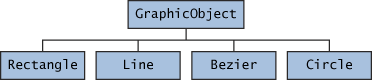
Classes Rectangle, Line, Bezier, and Circle Inherit from GraphicObject
First, you declare an abstract class,
GraphicObject, to provide member variables and methods that are wholly shared by all subclasses, such as the current position and themoveTo method. GraphicObject also declares abstract methods for methods, such as draw or resize, that need to be implemented by all subclasses but must be implemented in different ways. The GraphicObject class can look something like this:abstract class GraphicObject {
int x, y;
...
void moveTo(int newX, int newY) {
...
}
abstract void draw();
abstract void resize();
}
Each nonabstract subclass of
GraphicObject, such as Circle and Rectangle, must provide implementations for the draw and resize methods:class Circle extends GraphicObject {
void draw() {
...
}
void resize() {
...
}
}
class Rectangle extends GraphicObject {
void draw() {
...
}
void resize() {
...
}
}
When an Abstract Class Implements an Interface
In the section on
Interfaces, it was noted that a class that implements an interface must implement all of the interface's methods. It is possible, however, to define a class that does not implement all of the interface's methods, provided that the class is declared to be abstract. For example,abstract class X implements Y {
// implements all but one method of Y
}
class XX extends X {
// implements the remaining method in Y
}
In this case, class
X must be abstract because it does not fully implement Y, but class XX does, in fact, implement Y.Class Members
An abstract class may have
static fields and static methods. You can use these static members with a class reference (for example, AbstractClass.staticMethod()) as you would with any other class.Object里几种关键的methods
The
Object class, in the java.lang package, sits at the top of the class hierarchy tree. Every class is a descendant, direct or indirect, of the Object class. Every class you use or write inherits the instance methods of Object. You need not use any of these methods, but, if you choose to do so, you may need to override them with code that is specific to your class. The methods inherited from Object that are discussed in this section are:protected Object clone() throws CloneNotSupportedException
Creates and returns a copy of this object.public boolean equals(Object obj)
Indicates whether some other object is "equal to" this one.protected void finalize() throws Throwable
Called by the garbage collector on an object when garbage
collection determines that there are no more references to the objectpublic final Class getClass()
Returns the runtime class of an object.public int hashCode()
Returns a hash code value for the object.public String toString()
Returns a string representation of the object.
The
notify, notifyAll, and wait methods of Object all play a part in synchronizing the activities of independently running threads in a program, which is discussed in a later lesson and won't be covered here. There are five of these methods:public final void notify()public final void notifyAll()public final void wait()public final void wait(long timeout)public final void wait(long timeout, int nanos)
Note: There are some subtle aspects to a number of these methods, especially the
clone method.The clone() Method
If a class, or one of its superclasses, implements the
Cloneable interface, you can use the clone() method to create a copy from an existing object. To create a clone, you write:aCloneableObject.clone();
Object's implementation of this method checks to see whether the object on which clone() was invoked implements the Cloneable interface. If the object does not, the method throws a CloneNotSupportedException exception. Exception handling will be covered in a later lesson. For the moment, you need to know that clone() must be declared asprotected Object clone() throws CloneNotSupportedException
or:
public Object clone() throws CloneNotSupportedException
if you are going to write a
clone() method to override the one in Object.
If the object on which
clone() was invoked does implement the Cloneable interface, Object's implementation of the clone() method creates an object of the same class as the original object and initializes the new object's member variables to have the same values as the original object's corresponding member variables.
The simplest way to make your class cloneable is to add
implements Cloneable to your class's declaration. then your objects can invoke the clone() method.
For some classes, the default behavior of
Object's clone() method works just fine. If, however, an object contains a reference to an external object, say ObjExternal, you may need to override clone() to get correct behavior. Otherwise, a change in ObjExternal made by one object will be visible in its clone also. This means that the original object and its clone are not independent—to decouple them, you must override clone() so that it clones the object and ObjExternal. Then the original object referencesObjExternal and the clone references a clone of ObjExternal, so that the object and its clone are truly independent.The equals() Method
The
equals() method compares two objects for equality and returns true if they are equal. The equals() method provided in the Object class uses the identity operator (==) to determine whether two objects are equal. For primitive data types, this gives the correct result. For objects, however, it does not. The equals() method provided by Objecttests whether the object references are equal—that is, if the objects compared are the exact same object.
To test whether two objects are equal in the sense of equivalency (containing the same information), you must override the
equals() method. Here is an example of a Book class that overrides equals():public class Book {
...
public boolean equals(Object obj) {
if (obj instanceof Book)
return ISBN.equals((Book)obj.getISBN());
else
return false;
}
}
Consider this code that tests two instances of the
Book class for equality:// Swing Tutorial, 2nd edition
Book firstBook = new Book("0201914670");
Book secondBook = new Book("0201914670");
if (firstBook.equals(secondBook)) {
System.out.println("objects are equal");
} else {
System.out.println("objects are not equal");
}
This program displays
objects are equal even though firstBook and secondBook reference two distinct objects. They are considered equal because the objects compared contain the same ISBN number.
You should always override the
equals() method if the identity operator is not appropriate for your class.Note: If you override
equals(), you must override hashCode() as well.The finalize() Method
The
Object class provides a callback method, finalize(), that may be invoked on an object when it becomes garbage. Object's implementation of finalize() does nothing—you can override finalize() to do cleanup, such as freeing resources.
The
finalize() method may be called automatically by the system, but when it is called, or even if it is called, is uncertain. Therefore, you should not rely on this method to do your cleanup for you. For example, if you don't close file descriptors in your code after performing I/O and you expect finalize() to close them for you, you may run out of file descriptors.The getClass() Method
You cannot override
getClass.
The
getClass() method returns a Class object, which has methods you can use to get information about the class, such as its name (getSimpleName()), its superclass (getSuperclass()), and the interfaces it implements (getInterfaces()). For example, the following method gets and displays the class name of an object:void printClassName(Object obj) {
System.out.println("The object's" + " class is " +
obj.getClass().getSimpleName());
}
The
Class class, in the java.lang package, has a large number of methods (more than 50). For example, you can test to see if the class is an annotation (isAnnotation()), an interface (isInterface()), or an enumeration (isEnum()). You can see what the object's fields are (getFields()) or what its methods are (getMethods()), and so on.The hashCode() Method
The value returned by
hashCode() is the object's hash code, which is the object's memory address in hexadecimal.
By definition, if two objects are equal, their hash code must also be equal. If you override the
equals() method, you change the way two objects are equated and Object's implementation of hashCode() is no longer valid. Therefore, if you override the equals() method, you must also override the hashCode() method as well.The toString() Method
You should always consider overriding the
toString() method in your classes.
The
Object's toString() method returns a String representation of the object, which is very useful for debugging. The String representation for an object depends entirely on the object, which is why you need to override toString() in your classes.
You can use
toString() along with System.out.println() to display a text representation of an object, such as an instance of Book:System.out.println(firstBook.toString());
which would, for a properly overridden
toString() method, print something useful, like this:ISBN: 0201914670; The Swing Tutorial; A Guide to Constructing GUIs, 2nd Edition
ZZ from https://docs.oracle.com/javase/tutorial/java/IandI/objectclass.html
2015年10月19日星期一
鏖战Maven
项目需要用maven实现soapui自动测试。
开始单个测试很简单,之后的多个测试自动化颇花费我几天研究。以下两个链接有一定帮助。
http://appletest.lofter.com/post/1d595918_7f8880b
http://forum.loadui.org/viewtopic.php?f=14&t=5381&sid=287d90541a28f9243a7010fb683173f5
最终是用一个parent pom 以及多个child pom解决。(maven 的 profile)
Parent pom.xml :
<?xml version="1.0" encoding="UTF-8"?>
<project xmlns="http://maven.apache.org/POM/4.0.0"
xmlns:xsi="http://www.w3.org/2001/XMLSchema-instance"
xsi:schemaLocation="http://maven.apache.org/POM/4.0.0
http://maven.apache.org/maven-v4_0_0.xsd">
<modelVersion>4.0.0</modelVersion>
<groupId>org.pbs.tno.ci.test</groupId>
<artifactId>master</artifactId>
<version>1.0</version>
<packaging>pom</packaging>
<name>Automated Testing Master</name>
<pluginRepositories>
<pluginRepository>
<id>SmartBearPluginRepository</id>
<url>http://www.soapui.org/repository/maven2/</url>
</pluginRepository>
</pluginRepositories>
<properties>
<soapui.rootdir>/../SOAPUI</soapui.rootdir>
</properties>
<profiles>
<profile>
<id>test</id>
<properties>
</properties>
<modules>
<module>Tests/SimpleTest/TestCase1</module>
</modules>
</profile>
<profile>
<id>notification_agent</id>
<modules>
<module>Tests/NotificationAgent/TestCase1</module>
</modules>
</profile>
<profile>
<id>qc_service</id>
<modules>
<module>Tests/QCService/TestCase1</module>
</modules>
</profile>
<profile>
<id>transfer_service</id>
<modules>
<module>Tests/TransferService/TestCase1</module>
</modules>
</profile>
</profiles>
</project>
Child pom:
<project xmlns="http://maven.apache.org/POM/4.0.0" xmlns:xsi="http://www.w3.org/2001/XMLSchema-instance"
xsi:schemaLocation="http://maven.apache.org/POM/4.0.0 http://maven.apache.org/xsd/maven-4.0.0.xsd">
<modelVersion>4.0.0</modelVersion>
<parent>
<groupId>org.pbs.tno.ci.test</groupId>
<artifactId>master</artifactId>
<version>1.0</version>
<relativePath>../../../pom.xml</relativePath>
</parent>
<artifactId>TransferService</artifactId>
<packaging>jar</packaging>
<version>1.0-SNAPSHOT</version>
<name>testmaven2</name>
<pluginRepositories>
<pluginRepository>
<id>SmartBearPluginRepository</id>
<url>http://www.soapui.org/repository/maven2/</url>
</pluginRepository>
</pluginRepositories>
<build>
<plugins>
<plugin>
<groupId>com.smartbear.soapui</groupId>
<artifactId>soapui-pro-maven-plugin</artifactId>
<version>5.1.2</version>
<dependencies>
<dependency>
<groupId>org.reflections</groupId>
<artifactId>reflections</artifactId>
<version>0.9.9-RC1</version>
</dependency>
<dependency>
<groupId>org.apache.poi</groupId>
<artifactId>poi-ooxml</artifactId>
<version>3.10-FINAL</version>
</dependency>
<dependency>
<groupId>com.microsoft.sqlserver</groupId>
<artifactId>sqljdbc4</artifactId>
<version>4.0</version>
<scope>runtime</scope>
</dependency>
</dependencies>
<executions>
<execution>
<id>soapUI1</id>
<phase>test</phase>
<goals>
<goal>test</goal>
</goals>
<configuration>
<projectFile>/Feng/Maven SoapUI test projects/Build/Tests/TransferService/TestCase1/TransferService-soapui-project.xml</projectFile>
</configuration>
</execution>
</executions>
</plugin>
</plugins>
</build>
</project>
如果想同时run 这两个test,输入:
mvn test -Ptransfer_service -Ptest
如果用的是Ready API,千万要注意也得用Ready API Maven Plugin, 而不是SoapUI pro maven plugin! 血泪教训,花了整整两天才发现错误出自这!。
如果想同时run 这两个test,输入:
mvn test -Ptransfer_service -Ptest
如果用的是Ready API,千万要注意也得用Ready API Maven Plugin, 而不是SoapUI pro maven plugin! 血泪教训,花了整整两天才发现错误出自这!。
2015年10月1日星期四
Soapui Maven插件使用指南:soapui-pro-maven-plugin (转载)
- 安装 maven
- 下载soapui-pro-maven-plugin-5.1.2.jar 这是目前最新版本:
- 用命令安装插件包:mvn org.apache.maven.plugins:maven-install-plugin:2.5.2:install-file -Dfile=/Users/applewu/Downloads/soapui-pro-maven-plugin-5.1.2.jar -DgroupId=com.smartbear.soapui-DartifactId=soapui-pro-maven-plugin-5.1.2.jar -Dpackaging=jar;
- 为你的 soapui 项目准备相应的 pom.xml,保证 pom.xml 与 soapui 项目文件在同一目录下。pom.xml 格式参考官网:http://www.soapui.org/test-automation/maven/maven-2-x.html
- 命令运行 soapui 项目: mvn com.smartbear.soapui:soapui-pro-maven-plugin:5.1.2:test
# 踩过的坑
过程看起来很简单,如果你有了基础的maven知识,在前三步根本就没有问题,你会如愿地看到本地的maven库中已经下载了相关的jar包 (我的mac默认路径是:/Users/applewu/.m2/repository/)。咱们主要谈谈第4,5步。
## pom.xml 造成的坑
官网上有一个所谓的 full example,但你需要透彻地理解pom.xml与soapui项目之间的对应关系。你需要更新的字段有:
- project/groupId:取一个你认为有意义的命名-组织名
- project/artifactId:这个必须是你要执行的soapui项目的名称,比如文件名是Demo4SoapuiMaven-soapui-project.xml,那么artifactId就是Demo4SoapuiMaven
- project/name:取一个你认为有意义的命名-测试名
- project/url: 可以删掉
- plugin/version:你想用哪个插件版本就写哪个,最新是5.1.2
- plugin/executions/execution/configuration/projectFile: 待运行的soapui文件全名,如Demo4SoapuiMaven-soapui-project.xml
pom.xml如果有误,会直接影响 maven 的运行结果。如果你用的是ReadyAPI,还可能会遇到 NoClassDefFoundError: org/reflections/Configuration;那么你需要在plugin节点中加入:
```xml
<dependencies>
<dependency>
<groupId>org.reflections</groupId>
<artifactId>reflections</artifactId>
<version>0.9.9-RC1</version>
</dependency>
<dependency>
<groupId>org.apache.poi</groupId>
<artifactId>poi-ooxml</artifactId>
<version>3.10-FINAL</version>
</dependency>
</dependencies>
```
官网说明 http://readyapi.smartbear.com/readyapi/integration/maven/maven2
## 一行命令挖下的坑
第5步就是一个命令,哪来什么坑呢?而这才是最让我恶心的。大家都知道soapui有免费版和pro收费版,然而在readyapi 和 soapui的官网,full example 是以 pro 版本为例的,而 running tests 这一节中,又是以 免费版为例,做出的说明。即:mvn com.smartbear.soapui:soapui-maven-plugin:4.6.1:test
即便你在pom.xml 中定义的插件是soapui-pro-maven-plugin,但由于你在执行命令的时候,是照着官网文档,用soapui-maven-plugin,所以maven还是以免费版的soapui去执行你的脚本。这很容易让人困惑,因为你本地根本没有免费版的soapui,免费版和收费版的soapui从外观上就明显不一样,安装文件都是两套,不仅仅是active licenese的问题。
当然,如果你的soapui脚本中并没有用到pro版本的特性,比如json path assertion什么的,那么你体会不到有什么不同。否则,你照着官网文档的命令运行之后,soapui脚本会出现大面积 Errors,新手就难以理解了,因为抛出脚本的异常,而不是maven的异常,但其实脚本在你本地的soapui pro,用test runner运行一点儿问题也没有...
原帖: http://appletest.lofter.com/post/1d595918_7f8880b#
原帖: http://appletest.lofter.com/post/1d595918_7f8880b#
订阅:
评论 (Atom)